— sold — in stock — listings
AAXSTORE

BUY ADOPT PET HERE24/7 TRANSACTIONMORE CHEAP

No waiting for an admin. Pay the exact amount, hop into our private server, and our delivery bots trade the pet straight to you, day or night. The price you see is what you pay.

  1. How it works
  2. 1
    Choose your petType, Fly / Ride and quantity.
  3. 2
    Pay the exact amountBinance Pay, USDT BEP20 & LTC are confirmed automatically.
  4. 3
    Join & receiveWe send the server link when it's your turn.
  5. Full guide & video →

Pick your pet.

Every listing is real stock, read live from our delivery accounts.

Loading…

Questions.

How do I buy?

Follow our step-by-step How to buy guide with a short video. In short: pick your pet, pay the exact amount, press "I'm here", join the private server and accept the trade.

How do I receive my pet?

After your payment is confirmed, open Roblox and press "I'm here" on your order page. We start the trade on the first free delivery account: your order page shows a private server link (and we DM you on Discord). Join within 5 minutes and accept the trade from our account (otherwise the next buyer goes first and you can rejoin the queue) — the order completes automatically once the pet arrives.

Which payment methods are accepted?

USDT via Binance Pay ID or the BEP20 network, and Litecoin. Every order gets a unique amount, so Binance Pay, USDT BEP20 and Litecoin payments are detected automatically — no transaction ID needed. Litecoin prices are converted from USD at the live rate and locked when you order.

What do N, M, F and R mean?

N Neon, M Mega Neon, F Flyable, R Rideable.

What if I get disconnected or miss my turn?

Nothing is lost. We count what you already received; open your order and press “I'm ready — rejoin queue” to get the rest.
AAXSTORE

Terms & refund policy

Short and simple. By placing an order you agree to these terms.

How delivery works

Payments

Refunds

Contact

Questions about an order? Keep your order ID ready and contact our support.

AAXSTORE is a fan-run shop and is not affiliated with Roblox or Uplift Games.

HOW TO BUY

Get your pet in 8 easy steps

It takes about 3 minutes. Our delivery bots trade 24/7, so there is no waiting for an admin.

The video and pictures use example data (prices, names and order IDs).

  1. 1

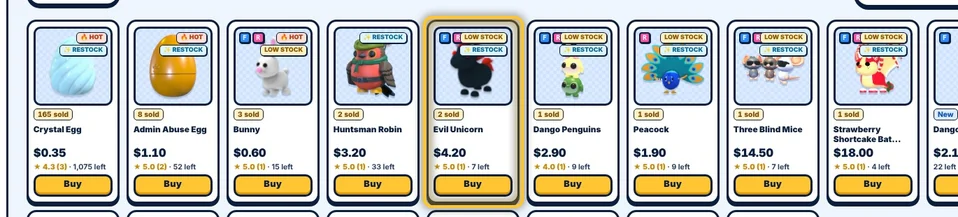
    Pick your pet

    Browse the shop or search at the top. Every card shows the price and the live stock of our delivery accounts.

    Pet cards in the shop with one pet highlighted
  2. 2

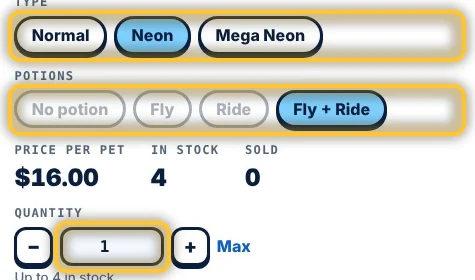
    Choose type, potions and amount

    Normal, Neon or Mega Neon; F = Flyable, R = Rideable. Set how many with + or Max. Want different pets? Press Add to cart and pay for everything at once.

    Type, potion and quantity buttons
  3. 3

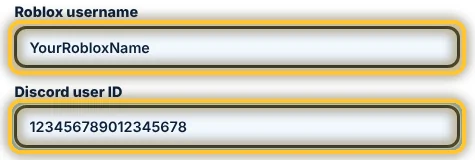
    Enter your Roblox username and Discord ID

    Type your Roblox username, not your display name. Your Discord user ID (17–20 digits) is where we DM you when it is your turn. Logged in with Discord? It is filled in for you.

    Roblox username and Discord user ID fields
  4. 4

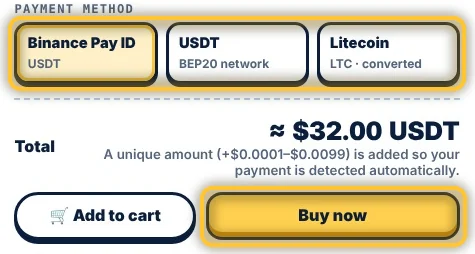
    Choose how to pay and press Buy now

    Pay with Binance Pay, USDT (BEP20 network) or Litecoin. The total is shown before you buy.

    Payment methods and the Buy now button
  5. 5

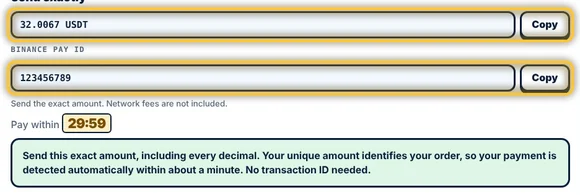
    Send the exact amount

    Copy the amount with every decimal and send it to the Binance Pay ID or address on your order page within 30 minutes. The unique decimals identify your order, so it is detected automatically: no screenshot or transaction ID needed.

    Order page with the exact amount and the address to pay
  6. 6

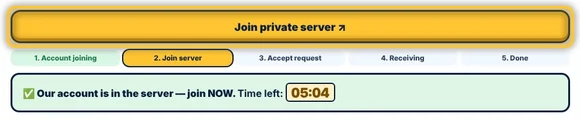
    Press "I'm here", then join the server

    Open Roblox first, then press I'm here — start my trade. When our delivery account is in the private server, press Join private server. You have 5 minutes to join.

    Join private server button on the order page
  7. 7

    Accept the trade in Roblox

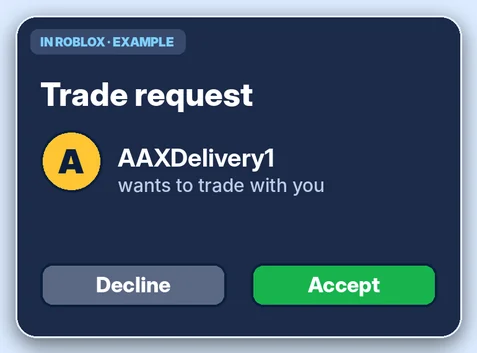
    Accept the trade request from our delivery account, check the pets, then press Accept and Confirm. Big orders come in several trades: keep accepting until everything has arrived.

    Example of a trade request with Accept and Decline buttonsExample picture
  8. 8

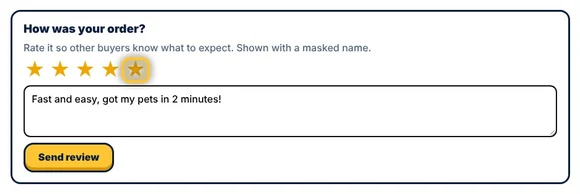
    Done! Leave a review

    Your order completes by itself as soon as the pets arrive. A quick review helps other buyers.

    Review box with five stars

Good to know

  • Keep your order ID. Press Track order at the top to open your order again at any time.
  • Where is my Discord user ID? Discord → User Settings → Advanced → turn on Developer Mode, then right-click your name → Copy User ID.
  • Missed your turn or got disconnected? Nothing is lost. Open your order and press "I'm ready — rejoin queue" to get the rest.
  • Sent a different amount, or not detected after 5 minutes? Use the option on your order page and our admin checks it.
  • Check before you pay: delivered pets cannot be refunded or exchanged. Read the terms & refund policy.

Top buyers.

Ranked by total spent. Every confirmed payment counts.

  1. Loading…

Live transactions.

The latest completed purchases, updated automatically.

  1. Loading…
Browse pets USDT · LTC
AAXSTORE

Type
Potions
Price per pet
In stock
Sold
Quantity
Payment method
Total

By buying you agree to receive the pet through an in-game trade. Not affiliated with Roblox.

AAXSTORE

Your cart

Several items, one payment. Each item is delivered by trade, one after another.

Payment method
Total

One payment for everything in your cart. Not affiliated with Roblox.

Track your order

Enter the order ID you received at checkout.